Tenebris: Terra Incognita PC Controls & UI
Move the squad, open every panel, and unlock careers without fighting the interface.
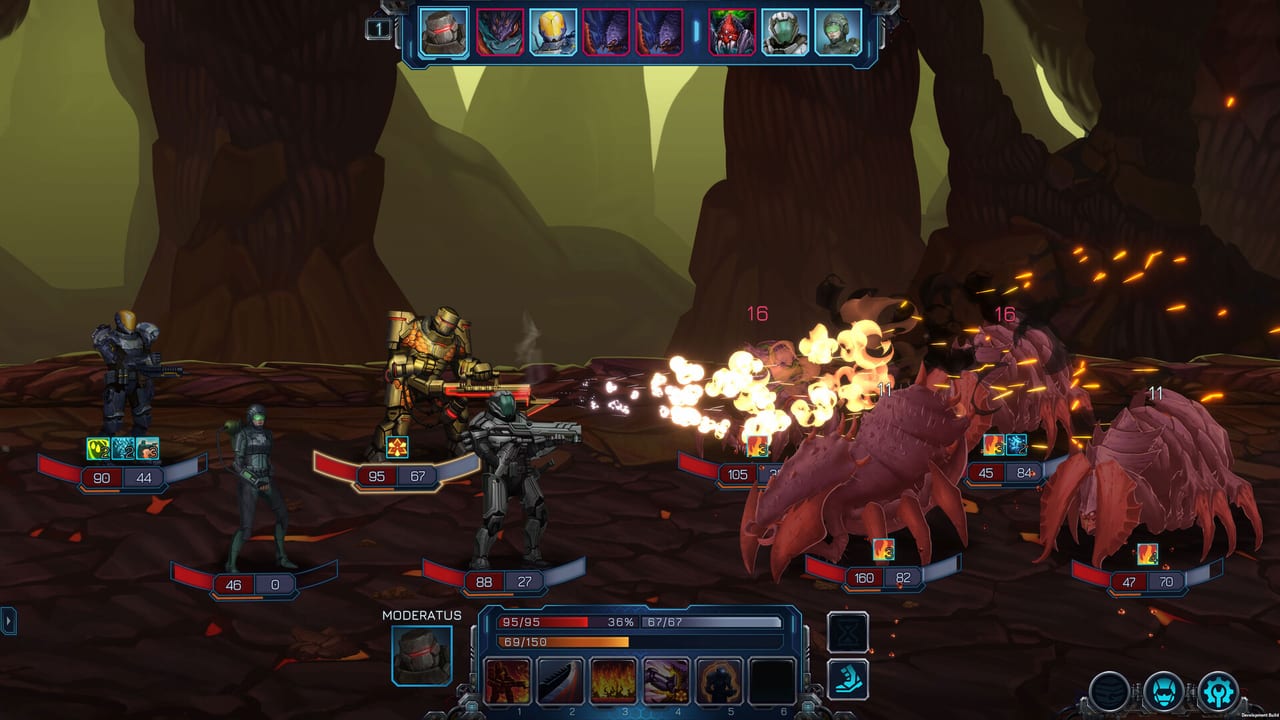
Winning fights in Tenebris: Terra Incognita starts before the first shot—when you still have time to drag formation tiles, check the bestiary, and unlock a career you forgot was waiting. This page is the Steam PC controls and UI reference for new lieutenants and returning EA players who missed QoL changes on the road to version 1.0.
Exact key bindings can be remapped in some builds; treat the labels below as the default mental model and confirm inside your options menu if a chord differs.
Battlefield basics
Tenebris is turn-based. On your turn you select a hero, choose a skill or move, pick a legal tile or target, then confirm. Miss chances and effect odds still exist, but the studio’s design goal is that your plan matters more than pure dice despair. That only works if you can see range overlays and cancel bad orders—learn the cancel/back input early so you do not soft-lock a marine into a suicide walk.
Camera and cursor. Use mouse movement to inspect tiles and hover enemy intents when tooltips are available. Scroll or trackpad gestures typically zoom the tactical view; if readability suffers on large bosses, zoom out before you commit movement.
Selecting the active hero. Click portraits or bodies to switch among the four deployed soldiers. Keep a consistent order in your head (tank → flex → damage → healer) so mid-fight swaps stay calm.
Formation drag — the most ignored skill
Your squad deploys in a 2×2 block with a front row and a rear row. Before the mission locks, drag heroes between formation slots so tanks occupy front tiles and fragile specialists sit behind them.
Typical safe setup:
- Front: Defencor-line tank + Miles or another medium-armor flex
- Rear: Pellentes-line sniper + Medicus
If your medic is tanking, you did not finish formation drag. Re-read Best Squads after you can rearrange tiles without thinking.
Strategic UI hotkeys and panels
Between missions on the Solaris and while planning sorties, you will constantly open the same panels. Learn them as a set:
- Map — mission select, risk reading, and route planning across biomes (including late Necronom spaces after 1.0).
- Inventory / arsenal — equip weapons and armor that modify stats and sometimes talents.
- Bestiary — enemy knowledge; check it when a new bug family appears instead of learning via wipe.
- Menu / pause stack — options, save/load access depending on context, and exit paths.
If your build uses keyboard shortcuts for these panels, practice opening map → inventory → bestiary in a calm hub moment until the sequence is automatic. The goal is zero hesitation when a briefing mentions an unfamiliar foe.
Unit menu and the Career hold-to-unlock
Open a hero’s unit menu, then the Career tab. Advanced classes appear on the left as icons. Press and hold the icon to unlock the career—single clicks confuse new players who think the feature is broken. After unlock, the hero converts and applies stored experience; waiting past the soft cap does not delete XP.
To reset talents toward a new plan, use the tier-1 class icon in the same Career window. Full explanation: Career System.
Combat quality-of-life habits
- Inspect enemy armor and status tooltips before spending once-per-fight bursts.
- Queue Forced March / mobility skills only after you see the opening spawn.
- Keep the healer’s actions flexible—do not pre-click a damage skill out of boredom.
- Use animation speed options (emphasized around 1.0) when replaying content after a save wipe warning.
Accessibility and comfort tips
- Lower animation speed only when you already understand telegraphs; new players should watch full anims once.
- Increase UI scale if skill icons blur on high-DPI monitors.
- Rebind conflicting global hotkeys from overlays (GPU software, clip tools) that steal map keys.
Connecting controls to better play
Controls do not replace builds. Once the UI is invisible, invest time in Basic Classes, the Hero Tier List, and Difficulty Tips. After patches, skim the Updates Hub in case new panels or QoL toggles appear.
Quick checklist before every sortie
- Formation drag finished?
- Inventory updated after the last arsenal buy?
- Bestiary checked for new biome tags?
- Career unlocks held, not clicked?
- Save created before a boss or promotion mission?
Master that checklist and the planet gets fairer—even when the bugs do not.
Frequently Asked Questions
Quick answers to the most common questions.
How do I rearrange my squad before a fight?
Drag heroes between the 2×2 formation slots so tanks take the front row and snipers/medics stay in the rear.
Why can’t I unlock a new class at level 11?
Open the Career tab and press-and-hold the class icon. A quick click usually does nothing.
Which panels should I open between missions?
Map for mission select, inventory/arsenal for gear, bestiary for new enemies, and the menu for saves/options.
Can I rebind keys?
Check the in-game options menu for remaps, and disable overlay hotkeys that conflict with map or menu shortcuts.
Where do I learn career resets?
Use the tier-1 icon in the Career window; details are on the Career System page.